Google Pacman Doodle: A Classic Arcade Experience
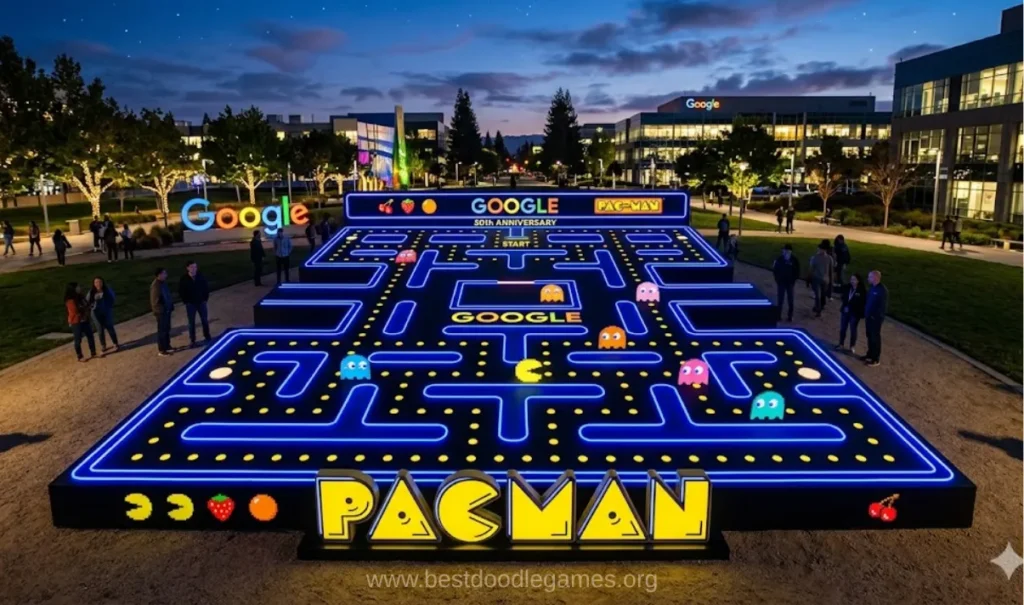
Google Pacman Doodle brings the classic Pac-Man experience into the browser through the interactive game originally created by Google. The Doodle was released on May 21, 2010, to celebrate Pac-Man’s 30th anniversary. Its maze was designed around the Google name, giving the familiar arcade game a distinctive Google-themed layout.
The basic objective remains simple: guide Pac-Man through the maze, eat pellets, collect power pellets, avoid ghosts, and continue toward a higher score. The combination of simple controls, recognizable characters, classic sound effects, and increasing difficulty makes the game easy to understand while still requiring quick reactions.
When Was the Google Pacman Doodle Released?
Google launched the playable Pac-Man Doodle on May 21, 2010. The release celebrated the 30th anniversary of Pac-Man, whose original arcade era dates back to 1980.
The Doodle was planned as a 1-day celebration, but its popularity helped preserve it as an important example of Google’s interactive Doodle history.
The key dates are:
- 1980 — original Pac-Man arcade game era
- 2010 — Google Pacman Doodle release year
- May 21, 2010 — exact Doodle launch date
- 30th anniversary — celebration behind the Doodle
- 1 day — original planned duration of the celebration
How to Play Google Pacman
The gameplay is built around navigating a maze while collecting objects and avoiding enemies. Pac-Man moves continuously through the pathways, and the player uses directional controls to choose where he goes next.
The basic gameplay sequence is straightforward:
- Start the game.
- Move Pac-Man through the maze.
- Collect regular pellets.
- Avoid Blinky, Pinky, Inky, and Clyde.
- Collect power pellets when needed.
- Chase vulnerable ghosts after activating a power pellet.
- Continue through increasingly challenging gameplay.
- Try to achieve a higher score.
The maze remains visually familiar, while ghost behavior and speed make later gameplay more demanding.
Pacman Ghosts and Their Roles
Four ghosts are central to the Pac-Man experience:
Blinky
Blinky is one of the four primary ghosts and is commonly identified by his red appearance. His movement is part of the challenge that forces players to plan their routes carefully.
Pinky
Pinky is another member of the four-ghost group. Like the other ghosts, Pinky contributes to the changing danger around the maze.
Inky
Inky is the cyan-colored ghost. His behavior is included among the different targeting patterns that can be explored through Learn Mode in the detailed browser recreation.
Clyde
Clyde is the orange ghost and completes the group of four classic enemies.
Together, Blinky, Pinky, Inky, and Clyde create the main obstacle for Pac-Man. Understanding their movement patterns becomes increasingly useful as gameplay becomes more challenging.
Power Pellets and Ghost Chasing
Power pellets provide one of the most important changes in the normal gameplay cycle. Regular pellets allow Pac-Man to clear the maze, while power pellets temporarily make the ghosts vulnerable.
The detailed Pac-Man recreation places 4 power pellets in the 4 corners of the maze.
After collecting a power pellet, Pac-Man can turn from being chased into the chaser. Vulnerable ghosts can then be eaten for bonus points.
This creates a simple strategic choice: collect pellets safely, use the corners when necessary, and take advantage of the temporary opportunity to chase ghosts.
Pacman Scoring System
The scoring system adds another layer of strategy to the game. Regular dots, power pellets, ghosts, and fruits can all contribute to the player’s score.
The supplied gameplay information gives these specific values:
- Regular dot — 10 points
- Power pellet — 50 points
- First frightened ghost — 200 points
- Second frightened ghost — 400 points
- Third frightened ghost — 800 points
- Fourth frightened ghost — 1,600 points
- All four ghosts — 3,000 bonus points
- Fruit — 100 to 5,000 points depending on the stage
This means that the four-ghost sequence increases from 200 to 400, then 800, and finally 1,600 points. Players who can safely eat multiple vulnerable ghosts can therefore increase their score significantly.
Fruits and Stage Progression
Fruits provide another source of points during gameplay. The detailed recreation describes 2 fruits per stage, with their values ranging from 100 to 5,000 points depending on the stage number.
As gameplay progresses, the challenge also increases. Ghost speed becomes greater and their behavior becomes more difficult to manage, requiring faster reactions and better awareness of their movement.
Google-Shaped Maze
One of the most recognizable features of the Google Pacman Doodle is its maze. Instead of using an ordinary arcade layout, the Doodle incorporates the Google name into the maze design.
This gives the 2010 Doodle a visual identity that separates it from a standard Pac-Man board while keeping the familiar maze-based gameplay intact.
The combination of the Google-shaped maze, pixel-style visuals, classic sounds, pellets, power pellets, and four ghosts creates the nostalgic arcade feel associated with the original game.
Pacman Controls
The standard desktop controls are simple and require no complicated setup.
For the main player:
- Arrow Up — move upward
- Arrow Down — move downward
- Arrow Left — move left
- Arrow Right — move right
The game uses the 4 arrow keys as its primary movement controls.
A two-player experience is also associated with the original Doodle. In that mode, Ms. Pac-Man can be controlled using:
- W — up
- A — left
- S — down
- D — right
This gives the second player a separate control system from the arrow keys used by the first player.
Two-Player Pacman Mode
The Google Pacman Doodle included a 2-player experience. The second player takes the role of Ms. Pac-Man, adding another playable character to the maze.
The two-player feature is one of the reasons the Doodle stands out from a simple single-player Pac-Man recreation. Instead of only controlling Pac-Man, players can experience the maze together through the additional character.
The supplied competitor information identifies Ms. Pac-Man as the second-player character and connects the second-player controls with W, A, S, and D.
Three Playable Versions
The broader browser recreation described by PacmanOnline includes 3 playable versions:
- Pac-Man
- Ms. Pac-Man
- Cookie-Man
This makes the experience broader than the original Google Doodle alone. Pac-Man remains the central version, while Ms. Pac-Man and Cookie-Man provide alternative ways to play.
Practice Mode and Learn Mode
The detailed browser version also adds features designed to help players understand and practice the game.
Practice Mode includes several useful functions:
- Rewind gameplay by up to 10 seconds
- Slow the game to half speed
- Slow the game to quarter speed
- Use invincibility
- Activate Turbo Mode
These options allow players to study movement, practice routes, and experiment with ghost behavior without relying entirely on normal-speed gameplay.
Learn Mode goes further by showing the current target tile of each ghost through a colored overlay. This makes it easier to understand how Blinky, Pinky, Inky, and Clyde approach the maze.
Turbo and Invincibility Features
Turbo Mode changes the speed of the experience, while Invincibility provides a safer environment for practice.
The supplied controls identify:
- O — Turbo Mode
- I — Invincibility
- 1 / 2 — slow-speed controls
- Shift — rewind
- Esc — menu
These features are particularly useful for learning movement and experimenting with routes rather than simply trying to achieve a high score.
Mobile and Touch Controls
The browser experience is also designed around modern devices. Desktop players can use arrow keys, while mobile users can use on-screen controls or touchscreen gestures.
Touch controls include:
- Swipe up
- Swipe down
- Swipe left
- Swipe right
The supplied information also recommends rotating smaller phones into landscape orientation to provide a larger playing area.
Other enhanced interface features include improved screen scaling, laptop compatibility, phone support, tablet support, and dark mode.
Increasing Difficulty
Pacman begins with an easy-to-understand objective, but the challenge becomes greater as gameplay progresses.
Ghost speed increases with advancing levels, while their behavior becomes more difficult to manage. This means players need faster reactions and a better understanding of ghost movement.
The maze itself remains recognizable, but the increasing pressure makes route planning more important.
Why the Google Pacman Doodle Remains Popular
The appeal of the game comes from its combination of simplicity and challenge. The basic objective can be understood immediately, yet achieving a strong score requires careful movement and awareness.
Several elements work together:
- 1980 arcade origins
- 2010 Google Doodle celebration
- 30th anniversary connection
- Google-shaped maze
- 4 classic ghosts
- Power pellets
- Fruit bonuses
- Two-player gameplay
- Simple arrow-key controls
- Touch support
- Increasing difficulty
- Classic arcade presentation
The result is an experience that connects the original Pac-Man concept with the interactive style of a Google Doodle.
Frequently Asked Questions
When was Google Pacman Doodle released?
The Google Pacman Doodle was launched on May 21, 2010, as part of Pac-Man’s 30th anniversary celebration.
How many ghosts are in Pac-Man?
There are 4 classic ghosts: Blinky, Pinky, Inky, and Clyde.
How many points is a regular Pac-Man dot worth?
A regular dot is worth 10 points.
How many points is a power pellet worth?
A power pellet is worth 50 points.
How many points can the four frightened ghosts provide?
The ghost sequence is 200, 400, 800, and 1,600 points. The supplied information also gives a 3,000-point bonus for all four ghosts.
How many power pellets are there?
The detailed recreation places 4 power pellets in the 4 corners of the maze.
Does Pac-Man have two-player mode?
Yes. The Google Doodle included a 2-player experience in which Ms. Pac-Man can join the game.
What controls does the second player use?
The second player uses W, A, S, and D to control Ms. Pac-Man.
What playable versions are available in the detailed recreation?
The supplied information identifies 3 versions: Pac-Man, Ms. Pac-Man, and Cookie-Man.
What year did the original Pac-Man arcade game appear?
The original Pac-Man arcade game dates to 1980.
Final Takeaway
Google Pacman Doodle combines the classic 1980 Pac-Man experience with Google’s interactive Doodle format from 2010. Its May 21, 2010 release celebrated the game’s 30th anniversary and introduced a Google-shaped maze filled with pellets, power pellets, fruits, and 4 famous ghosts.
Beyond the basic Doodle experience, the supplied browser recreation information adds 3 playable versions, detailed scoring, Practice Mode, Learn Mode, Turbo Mode, Invincibility, touch controls, and 2-player gameplay. Whether the goal is nostalgia, learning ghost behavior, or chasing a higher score, the core experience remains simple: move carefully, collect everything you can, and stay ahead of the ghosts.