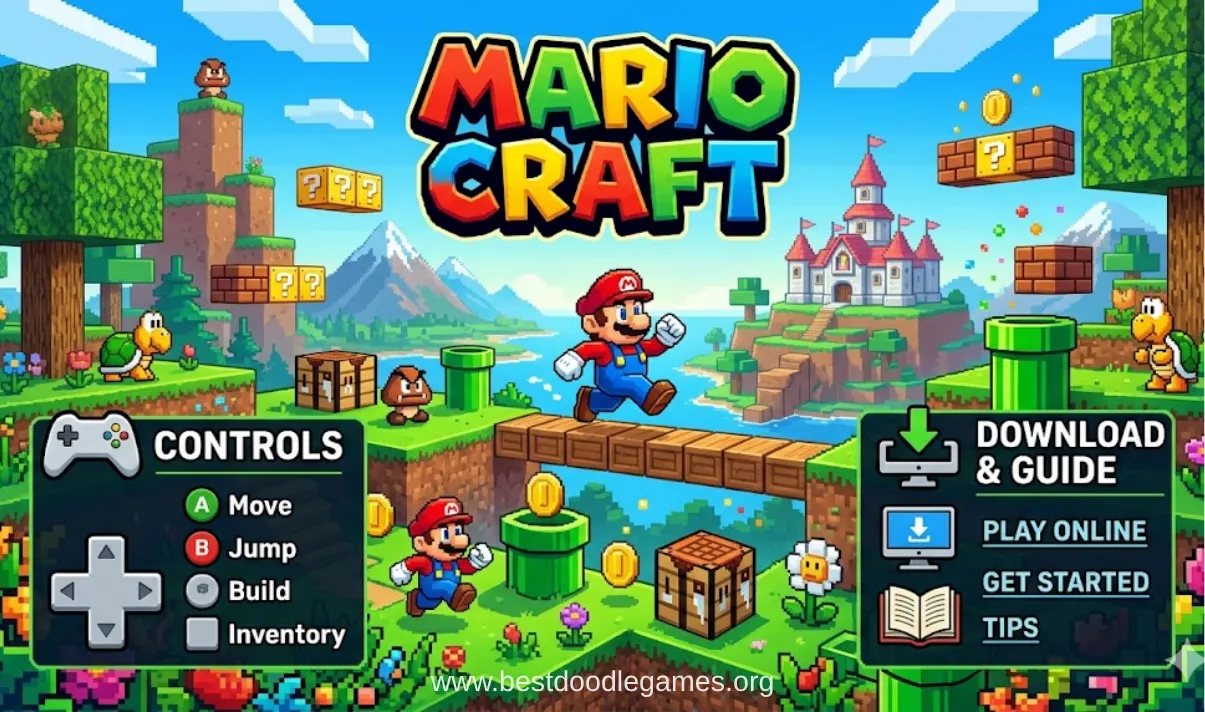
Mario Craft, also known as Mariocraft or Craft: Super Mario Edition on some websites, is a fan-made game inspired by both Minecraft and Super Mario. The game combines block-building gameplay with Mario-style characters, environments, and colorful worlds. Most versions are free and playable directly in a browser, making them popular among kids and casual gamers who enjoy simple creative games.
The game focuses more on exploration and building rather than difficult survival mechanics. Players can create structures, explore open maps, and enjoy Mario-themed environments made from blocks. Since many versions run online without installation, Mario Craft is commonly played at home, in schools, or on shared computers.
What Is Mario Craft Game?
Why Kids Love Mario Craft
Kids enjoy Mario Craft because it combines familiar Mario-style gameplay with block-building mechanics similar to Minecraft. The bright graphics, cartoon visuals, and simple controls make the game easy to understand for younger players. Unlike many survival games, Mario Craft usually avoids heavy violence or scary content, which makes it feel more relaxing and beginner-friendly.
Another reason children enjoy the game is the creative freedom. Players can build houses, towers, platforms, and Mario-themed worlds using colorful blocks. Many versions allow players to experiment without strict objectives, which encourages imagination and creativity during gameplay.
Mario + Minecraft Style Gameplay Explained
Mario Craft mixes the side-scrolling feel of Mario games with Minecraft-inspired crafting and building systems. The environment is made of square blocks that players can collect, remove, and place anywhere on the map. The game world often includes Mario-style pipes, question blocks, enemies, and Mushroom Kingdom-inspired landscapes.
Players move around the map, collect materials, and use those resources to create their own structures. Some versions focus on sandbox gameplay, while others include light platforming and obstacle challenges inspired by classic Mario games.
Is Mario Craft Free to Play?
Most versions of Mario Craft are completely free to play online. Players usually do not need to buy the game or create an account before starting. Browser versions are commonly hosted on gaming portals that support HTML5 or WebGL gameplay.
Some websites may display advertisements around the game window because the hosting platforms rely on ads instead of charging users. Downloadable fan-made versions are also often shared for free by hobby developers and gaming communities.
Play Mario Craft Game Online
How to Start Playing in Browser
Mario Craft is commonly played through a web browser such as Chrome, Edge, or Firefox. To begin playing, users simply open a gaming website hosting the game and wait for it to load. Once the loading process finishes, players can press the play button and start exploring the world immediately.
Many gaming sites also display the controls underneath the game window so new players can quickly learn movement, jumping, and block placement before starting.
Do You Need to Download Anything?
Most browser versions of Mario Craft do not require any download or installation. The game loads directly from the website, making it convenient for quick play sessions. A stable internet connection and an updated browser are usually enough to run the game smoothly.
Some independent developers also release downloadable versions for offline gameplay, but these are optional. Most casual players simply use the online browser version because it is faster and easier to access.
Can You Play on Mobile or PC?
Mario Craft works best on PC because many versions are designed for keyboard controls. Desktop browsers generally provide smoother performance and easier building controls compared to touch devices.
However, some HTML5 versions also support mobile browsers. On phones and tablets, virtual buttons may appear on the screen for movement and actions. Certain Android games inspired by Mario Craft are also available through independent developers, although these may differ slightly from browser versions.
How to Play Mario Craft Game
Main Objective of the Game
The main goal of Mario Craft is usually creative building and exploration. Instead of following a strict story mode, players are encouraged to explore the world and create their own structures using blocks and collected resources.
Many players enjoy building Mario-themed castles, bridges, obstacle courses, and custom levels. Since most versions focus on sandbox gameplay, the experience is more about creativity than competition.
Building and Exploration
Players collect blocks by breaking parts of the environment and then reuse those materials to build new structures. Common activities include creating houses, pathways, towers, tunnels, and decorative landscapes.
Exploration is also an important part of gameplay. Players travel across maps, jump across platforms, and search for new areas to build in. Some worlds contain hidden locations or elevated platforms that encourage curiosity and experimentation.
Surviving Enemies and Obstacles
Although Mario Craft mainly focuses on building, some versions include enemies and platforming hazards inspired by classic Mario games. Players may encounter creatures similar to Goombas or face obstacles such as gaps, traps, and dangerous jumps.
Most enemies are simple to avoid or defeat, making the game suitable for children and beginner players. The difficulty level is usually lighter compared to traditional survival or action games.
Best Beginner Tips
New players can improve quickly by starting with simple building projects. Collecting basic blocks early helps create a safe space for practicing controls and construction.
Building a small house or base can make navigation easier and provide a useful starting point for exploration. Using bridges and raised platforms also helps players avoid enemies and move safely around the map.
Creative mode is ideal for beginners because it often provides unlimited blocks without survival pressure. This allows players to experiment freely and learn the game mechanics at their own pace.
Mario Craft Game Controls
Keyboard Controls
Most PC versions of Mario Craft use standard keyboard controls similar to platform and crafting games. Players typically use arrow keys or the A and D keys for movement. Jumping is often controlled with the spacebar or W key.
Some versions allow players to place or remove blocks using mouse clicks or number keys. Depending on the game version, players may also switch between different tools and building materials through a hotbar system.
Mobile Controls
Mobile browser versions usually display touch controls directly on the screen. These controls include movement arrows, jump buttons, and action icons for placing or removing blocks.
Performance depends on the device and browser quality. On larger screens such as tablets, gameplay often feels smoother because the controls are easier to use.
Control Settings and Customization
Certain downloadable versions include settings menus where players can customize controls. This may allow changing movement keys, adjusting sensitivity, or modifying gameplay preferences.
Custom controls are especially helpful for younger players who are more comfortable using specific keyboard layouts or touch settings.
Mario Craft Game Features
Open World Exploration
Mario Craft often includes large maps that players can freely explore. Instead of moving through short levels with a fixed ending, players can revisit locations and continue expanding their creations over time.
The open-world design encourages creativity and allows players to build almost anywhere in the environment.
Creative Building Mode
Creative mode is one of the most popular features in Mario Craft. Players receive unlimited resources and can focus entirely on construction without worrying about enemies or collecting materials.
This mode is perfect for creating pixel art, castles, obstacle courses, and custom Mario-inspired maps.
Mario-Inspired Characters and Blocks
The game combines block-style graphics with familiar Mario-inspired elements. Players may see question blocks, pipes, mushroom themes, and characters inspired by the Mario universe.
The colorful art style gives the game a nostalgic feeling while still maintaining a unique block-building appearance.
Easy Gameplay for Kids
Mario Craft is generally designed with simple gameplay mechanics that are easy for children to understand. Most versions avoid complicated crafting systems and focus on basic movement, jumping, and building.
Because of the relaxed gameplay style, the game appeals to younger audiences and casual players looking for stress-free entertainment.
Mario Craft Unblocked
What Does Unblocked Mean?
The term “unblocked” refers to versions of the game that can still be accessed on networks where gaming sites are restricted, such as schools or offices. These versions are usually hosted on websites that are not blocked by local internet filters.
How Students Play at School
Many students search for Mario Craft unblocked during breaks or free periods. Browser versions are popular because they launch quickly without requiring installation on school computers.
Even though the game may be accessible, players should still follow school internet rules and responsible computer usage policies.
Safe Browser Gaming Tips
Players should always use trusted gaming websites and avoid suspicious pop-ups or downloads. Clicking random advertisements or installing unknown extensions can create security risks.
Using updated browsers and parental supervision helps create a safer gaming experience for children.
Download Mario Craft Game Easily
How to Download on PC
Some fan-made versions of Mario Craft are available as downloadable files for PC. These files may come in ZIP folders or standalone executable formats.
After downloading, players usually extract the files and launch the game directly from the folder. Since these are unofficial projects, installation methods can vary between versions.
Android Download Guide
Several Android games use Mario-inspired block-building concepts. These games may be available on app stores or independent APK websites.
Users should only download files from trusted sources and carefully review permissions before installing anything on a device.
Is Mario Craft Safe to Install?
Safety depends mainly on the source of the download. Files from trusted gaming communities and established websites are generally safer than unknown file-sharing platforms.
Using antivirus software and checking user reviews can reduce risks. For younger players, browser-based versions are often safer because they avoid direct file installation.
Mario Craft Gameplay Video and Screenshots
Popular Gameplay Styles
Players often use Mario Craft for creative building projects and exploration. Some focus on designing large Mario-inspired levels, while others enjoy experimenting with different map layouts.
Gameplay videos commonly show building tutorials, obstacle challenges, and world exploration.
Funny and Creative Builds
Many players create giant Mario statues, pixel art, floating islands, and themed castles using colorful blocks. Screenshots shared online often highlight creative imagination and unusual designs.
Custom-made maps and obstacle courses are also popular within the community.
Speedrun and Challenge Modes
Some players create personal speedrun challenges by racing through custom maps or platform sections as quickly as possible. Others invent building competitions with limited resources or special rules.
These challenges add replay value and encourage players to improve their skills.
Similar Games Like Mario Craft
Minecraft Classic
Minecraft Classic offers similar building and sandbox gameplay with unlimited blocks and open-world creativity. Players who enjoy constructing structures in Mario Craft often enjoy Minecraft-style games as well.
Super Mario Bros
Classic Super Mario games focus more on platforming and level progression rather than block building. However, Mario Craft takes inspiration from the same characters, environments, and jumping mechanics.
Block Craft Games
Many browser and mobile block-crafting games provide open-world exploration and simple construction systems. These games appeal to players who enjoy creativity and relaxed gameplay experiences.
Pros and Cons of Mario Craft
What Players Like Most
Players appreciate Mario Craft because it is free, lightweight, and easy to access online. The combination of Mario visuals and block-building gameplay creates a fun and relaxing experience.
Children and casual players especially enjoy the creative freedom and beginner-friendly mechanics.
Common Problems or Bugs
Because many versions are unofficial fan projects, technical issues can sometimes appear. Players may experience lag, loading problems, or incomplete features depending on the website or device.
Some versions also provide limited tutorials, which can make controls confusing for first-time players.
FAQs
Is Mario Craft free?
Yes, most browser versions of Mario Craft are completely free to play online.
Can kids play Mario Craft safely?
The game is generally kid-friendly, but safety depends on the hosting website and advertisements shown around the game.
Is Mario Craft available on Android?
There is no official Nintendo version, but some Mario-inspired block-building games are available for Android devices.
Can I play Mario Craft without downloading?
Yes, many versions run directly inside a web browser without requiring installation.
What are the controls for Mario Craft?
Most versions use keyboard movement keys for walking and jumping, along with mouse or number keys for building actions.
Is Mario Craft unblocked at school?
Availability depends on the school network and which gaming sites are restricted.
Final Thoughts
Mario Craft combines the creativity of block-building games with the colorful style of the Mario universe. Its easy controls, browser-based accessibility, and kid-friendly gameplay make it a popular option for casual players and younger audiences.
Whether players want to explore open worlds, build custom Mario levels, or simply enjoy a relaxing browser game, Mario Craft offers a simple and creative experience that is easy to access and fun to experiment with.